
Select a different country or region to view content tailored to your location.


Chris Cammack is the Partner Manager and a financial writer at FxScouts. Chris builds and maintains our relationships with our partners to provide our users with the best Forex trading experience.


Risk management is essential in Forex trading! The Forex market can often be unpredictable, and even successful traders must endure losing trades. One of the most important ways to protect your Forex trading account is by using stop-loss orders. Of course, the ability to automatically close a winning trade at a specific price is also crucial. A take-profit order is used to perform this task effortlessly. Let’s learn more about using stop loss and take profit orders...
With a buy (long) trade, a stop loss can be placed below the entry price at which the currency pair or other asset is bought. In this case, the stop loss order will automatically close (liquidate) the trade by selling it if the market price reaches the level at which the stop loss is placed.
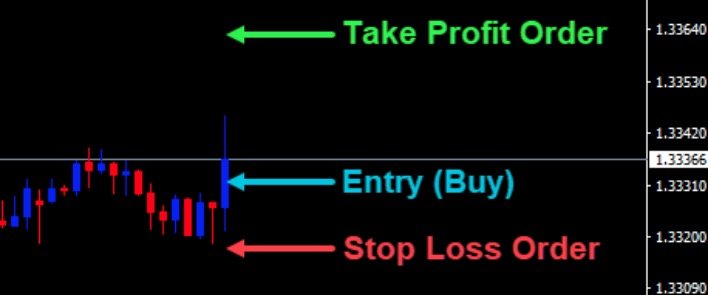
With a buy (long) trade, your stop loss is placed below the entry price, with a take profit above the entry price. If the price declines and hits your stop loss, you will make a loss; if the price ascends to hit your take profit, you will make a profit. Conversely, a stop loss can be attached to a sell (short) trade, in which case it is placed above the entry price and automatically closes (liquidates) the trade with a buy action if the price level of the stop loss is reached.
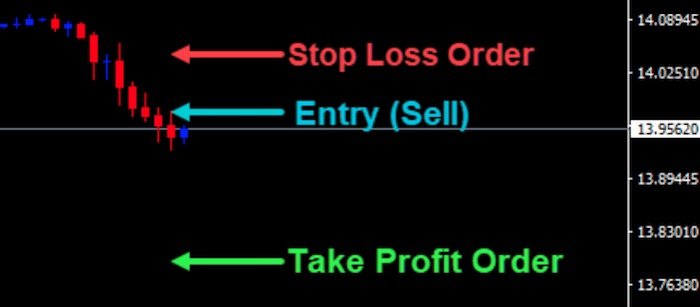 With a sell (short) trade, your stop loss is placed above the entry price, with a take profit below the entry price. If the price ascends and hits your stop loss, you will make a loss; if the price declines and hits your take profit, you will make a profit. Although a stop-loss order is generally an effective way to limit how much you can lose on a trade, there is no guarantee that your trade will close at the specific price at which your stop-loss is placed.
If market liquidity is thin or if there is a price gap, you could easily get a worse price than you expected. Of course, if positive slippage occurred, your stop-loss order could also be filled at a better price than you anticipated. Forex traders who carefully manage their risk and use acceptable amounts of leverage are unlikely to suffer notable losses due to price gaps that breach their stop-loss orders.
Before placing a trade, a trader needs to know how much money he is willing to lose on that particular trade. This amount will influence the lot size of the trade and, in some instances, the distance of the stop-loss in pips.
Let’s say you’ve noticed a decent support or resistance area and want to place your stop-loss just below or above it at a certain price level. So, you have chosen the price level for your stop-loss, but you need to know how many pips it is away from your potential entry price. To do this, you have two options:
Entry price: $1.00500
Stop loss: $1.00000
Entry price minus stop loss price = $0.005. The pip value in the US dollar (the quote currency) is 0.0001. Divide 0.005 by 0.0001, and you get 50. This is the distance of your stop loss in pips. For a short trade, subtract the entry price from the stop loss price and do the same calculation. If you’re not sure how to calculate the pip value (denominated in the quote currency) of a pair, you definitely need to read What is a Pip? Here, you will also learn how to calculate the pip value of any currency pair in the specific currency in which your trading account is denominated.
A take-profit order closes a trade automatically when the price of the traded asset reaches the price level at which the take-profit order is placed. Like a stop-loss order, a take-profit order is subject to potential positive or negative slippage. In certain instances, it may be preferred not to use a take-profit order. In this case, a trader would likely use a trailing stop loss to lock in his profit. Alternatively, the trader can close the trade manually at an optimal price and time. For more information regarding trailing stop losses, read How to Place My First Forex Trade. As displayed earlier in this guide, with a buy (long) trade, a take-profit order is placed above the entry price. With a sell (short) trade, it is placed below the entry price.
With any Forex trading platform, you can attach stop loss and take profit orders to your trades and orders. You can attach it to any of the following:
With the MT4 trading platform, you can open the order entry box by pressing F9 on your keyboard. Alternatively, you can right-click on the chart of your choice. Then select ‘Trading’, and then ‘New Order’. You will then see the following box on your screen:
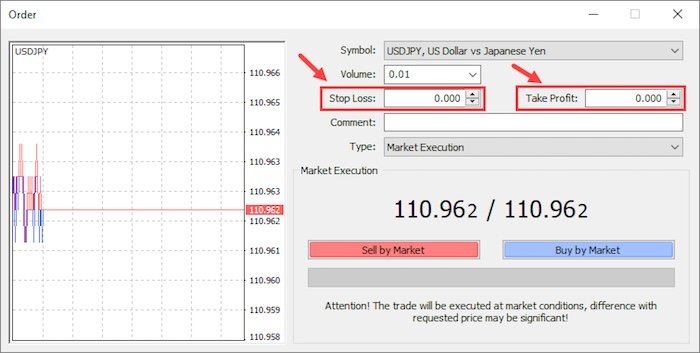
Here you can enter all the parameters of your market or pending orders, including stop loss and take profit price levels (see the red boxes). To find some of the best MT4 brokers, take a look at MT4 Forex Brokers. We also have a omprehensive MT4 guide to get you started with MetaTrader 4 quickly.
Explore more resources that fellow traders find helpful! Check out these other guides to enhance your forex trading knowledge and skills. Whether you’re searching for the best brokers, educational material, or something more specific, we’ve got you covered:

Compare the best Forex brokers in Malaysia and find the one that suits your trading style and budget.

Regulation is the most important consideration when choosing a broker. Learn how regulators protect traders and how the Forex market is regulated.

Explore the best Forex brokers for beginners in the Malaysia with user-friendly platforms, educational resources, and demo accounts.
Partner Manager and Financial Writer
Head of Content
Financial Writer